

What Are AI Labels in Healthcare and How Do They Work?

October 7, 2026

Share this article

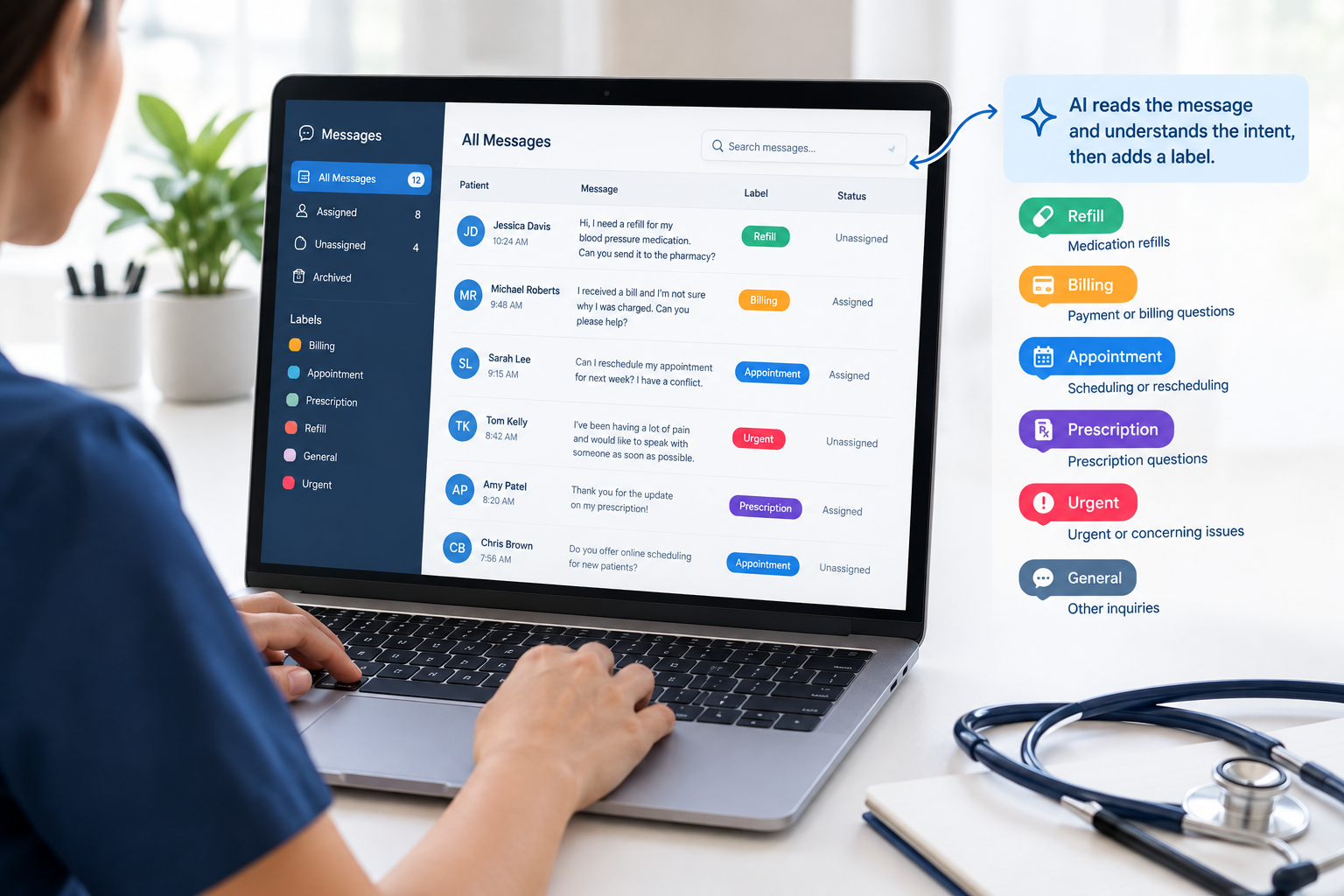
AI labels in healthcare are tags that get added to patient messages automatically, based on what each message says. If a patient texts about a refill, the message gets a "Refill" label. If they ask about a bill, it gets "Billing." Your staff can see what a message is about before they open it.


More patients text their practice now instead of calling. Text messaging in healthcare is convenient for patients, but it means the inbox fills up fast. Refill requests, schedule changes, billing questions, and the odd urgent message all show up in one place, in no particular order.


In this post, we'll explain what AI labels are, how they work, and how they can help with everyday patient communication.


What Is an AI Label?

An AI label is a tag that software adds to a message after reading it. It looks at what the patient means, not just the exact words they use. In a medical practice, AI labels group messages into topics like refills, billing, scheduling, or urgent concerns, so the right person can pick them up.


AI labeling is a type of text labeling. Think of how your email puts promotions in a separate tab. AI labels do something similar for patient texts and messages.


The AI label meaning can be confusing because the term is used in two ways. On social media, an AI label tells you a post was made with AI. In patient communication, it's the opposite. The AI reads the message and adds a label for your team.


AI Labels vs. Manual Labels vs. Rule-Based Auto Labeling


Most practices already sort messages somehow. Here's a quick comparison.

Terms Manual labels Rule-based auto labeling AI labels
Who adds the label Staff Software Software
How it decides Staff reads the message Looks for set keywords Reads what the message means
Works with different wording Yes Only if the keyword is there Yes
Upkeep Every message, every day Keyword lists need updates Check results now and then

Here's a simple example. A patient texts, "Can I move my Tuesday visit?" They never say "reschedule," so a keyword rule won't catch it. An AI label for rescheduling can, because it understands what the patient wants.


How Do AI Labels Work?

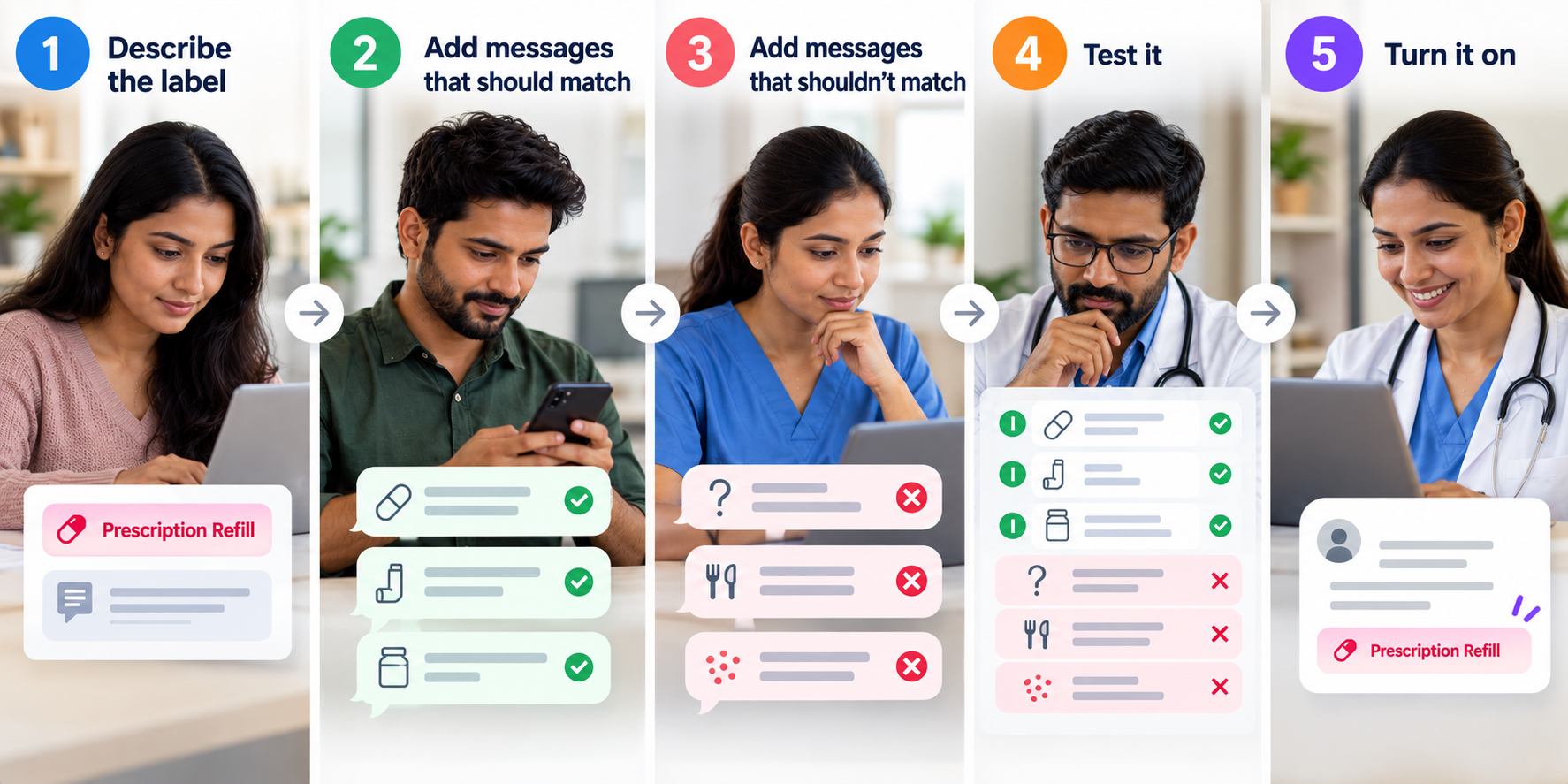
You don't need to write rules. You tell the AI what the label is for and show it a few examples.


  1. Describe the label. Write a short note on when it should apply. For example: "Patient is asking for a prescription refill or wants to change pharmacies."
  2. Add messages that should match. For example: "I'm almost out of my blood pressure meds."
  3. Add messages that shouldn't match. This is optional. It helps with messages that look similar but aren't the same, like a question about side effects.
  4. Test it. Run the label on messages you've already received and see which ones it would tag.
  5. Turn it on. New messages that fit get labeled as they come in.


This is called message classification. The AI checks each new message against your description and examples and decides if the label fits.


AI-assisted labeling used to be something only big health systems could do. They built their own models and trained them on thousands of messages their staff had labeled by hand. Now a practice can set up a label with a short description and a few examples.


Why Practices Use AI Labels for Patient Messages

Some of the best data on AI labeling comes from Kaiser Permanente. Their researchers published a study in JAMA Network Open on using AI to label patient messages and send them to the right person. Out of more than 4.7 million messages, 31.9% were handled before they reached a specific physician's inbox. Most practices don't see that kind of volume, but the problem is the same: too many messages and not enough time to sort them.


Urgent messages get seen sooner


When every message looks the same, a patient with a worrying symptom can get stuck behind a pile of routine texts. An urgent label helps staff see those first.


Messages go to the right person


Billing questions should go to billing. Refill requests should go to whoever handles prescriptions. In a healthcare messaging system with a shared inbox, you can link labels to team members, so messages reach the right person without someone having to forward them.


The inbox is easier to work through


Staff can filter by label and work through one type of message at a time. Over time, you can also see which kinds of requests take up most of your team's day.


Common AI Label Examples for a Practice


Start with the messages your team gets most often. These labels cover common medical text messaging requests and work for most specialties.

Label Should match Should not match
Refill request "Can you send my refill to the CVS on Main?" "Is it normal to feel dizzy on this medication?"
Billing question "Why did I get a bill for $40?" "Do you take Aetna?"
Reschedule or cancel "Something came up, can we do Thursday instead?" "What time is my appointment?"
New patient inquiry "Are you accepting new patients?" "I need to update my address."
Records or forms "Can you fax my records to my new doctor?" "Where do I park?"
Urgent concern "My incision is red and swollen today." "Can I get a flu shot next week?"

Tips for Setting Up AI Labels


  • Stick to one topic per label. "Billing and insurance" might seem like one group, but those questions often go to different people. Two labels work better.
  • Write it like you're explaining it to a new hire. Skip the shorthand. "Patient wants to change or cancel an appointment" is clearer than "resched."
  • Use real patient messages as examples. Patients send short texts like "need refill," make typos, and ask two things at once. Your examples should look like that too.
  • Test first, then keep an eye on it. Check labeled messages for the first few weeks. If a label keeps tagging the wrong messages, add one of them as a "should not match" example and test again.


What AI Labels Don't Do


AI labels help with provider-patient communication, but they don't replace it. They don't reply to patients or make medical decisions. Your staff still reads and answers every message.


This is important for urgent messages. A label can help your team spot them sooner, but you still need a plan for handling symptoms that can't wait. Providence, which built its own AI tool for sorting patient portal messages, describes it the same way: the AI helps staff decide what to look at first, and people do the replying. It also helps to see which labels the AI added. That way your team can check its work and catch mistakes.


Conclusion


For practices that use secure patient messaging, AI labels in healthcare make a busy inbox easier to manage. They read each message, tag it by topic, and help it reach the right person sooner. To set one up, you need a clear description, a few good examples, and a quick test on real messages.


If you're comparing AI labeling tools, check three things. Can you test labels on your own messages? Do the labels work with the filters and routing you already use? Can you see which labels the AI added? If your team spends the start of each day sorting through texts, AI labels are worth a look. Book a SimpleChime demo to see how they work with your practice's messages.

FAQs

  • What is an AI label in healthcare?

    An AI label is a tag that gets added to a patient message automatically, based on what the message says. It helps your team sort messages by topic, like refills, billing, or scheduling.

  • How many AI labels should a practice start with?

    Three to five is a good start. Pick the messages your team gets most, like refills, billing, and rescheduling, and add more later.

  • What if an AI label tags the wrong message?

    Staff can change the label on any message. If the same mistake keeps happening, add that message as a "should not match" example and test again.

  • What is the difference between AI labels and AI chatbots?

    AI labels sort messages for your staff, while AI chatbots reply to patients directly. With AI labels, a person on your team still reads and answers every message.

Recent Posts

patient experience
September 25, 2026
Patients want more than short wait times. See what the real patient experience looks like and how practices can improve it without more staff.
text messaging in healthcare
September 16, 2026
See how text messaging in healthcare is improving patient care, from faster responses to fewer missed appointments, and how practices are adopting it.
appointment reminder
September 8, 2026
Compare appointment reminder text and email for open rates, response speed, and no-show reduction, then see which channel fits each patient message
Appointment reminder software
August 28, 2026
Explore appointment reminder software, how automated reminders work, and how practices can save staff time and reduce patient no-shows.
August 26, 2026
Learn how bulk text messaging cuts no-shows and phone calls for medical practices, plus what to look for in HIPAA-compliant software.
 Patient Scheduling Software
August 17, 2026
Find the best patient scheduling software for your practice. Compare pricing, features, and EHR sync across 8 top healthcare scheduling software options.

patient-centered communication
August 7, 2026
See what patient-centered communication looks like across patient care, from provider conversations to everyday messaging, and how it builds trust with patients.
Patient self-scheduling software
August 6, 2026
Discover the benefits of patient self-scheduling software, healthcare scheduling software, and patient appointment scheduling software for modern medical practices.
HIPAA-compliant texting apps
July 31, 2026
Compare the best HIPAA-compliant texting apps for medical practices in 2026. Explore features, pricing, pros, cons, and choose the right software.
AI Voice Assistant
July 28, 2026
Learn how AI voice agents automate patient calls, schedule appointments, answer common questions, and support healthcare practices.
Show More